
Mixtral
Overview
In this guide, we provide an overview of the Mixtral 8x7B model, including prompts and usage examples. The guide also includes tips, applications, limitations, papers, and additional reading materials related to Mixtral 8x7B.
Introduction to Mixtral (Mixture of Experts)
Mixtral 8x7B is a Sparse Mixture of Experts (SMoE) language model released by Mistral AI. Mixtral has a similar architecture as Mistral 7B but with a key difference: each layer in Mixtral 8x7B is composed of 8 feedforward blocks (experts).
Architecture Details
- Type: Decoder-only model
- Expert Selection: For every token, at each layer, a router network selects 2 experts (from 8 distinct groups of parameters)
- Output Combination: Combines expert outputs additively through weighted sum
- Total Parameters: 47B parameters
- Active Parameters: Only 13B per token during inference
Mixture of Experts Layer

Benefits
- Better cost control and latency management
- Faster inference (6x faster than Llama 2 80B)
- Efficient parameter usage (only fraction of total parameters per token)
Training Details
- Data: Open Web data
- Context size: 32k tokens
- License: Apache 2.0
Mixtral Performance and Capabilities
Core Capabilities
Mixtral demonstrates strong capabilities in:
- Mathematical reasoning
- Code generation
- Multilingual tasks (English, French, Italian, German, Spanish)
Model Comparison
The Mixtral 8x7B Instruct model surpasses:
- GPT-3.5 Turbo
- Claude-2.1
- Gemini Pro
- Llama 2 70B
Performance vs. Llama 2
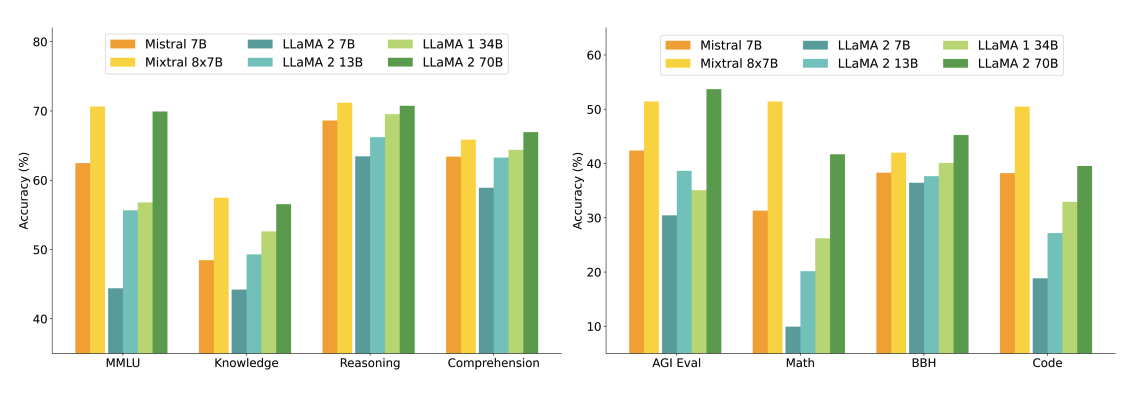
The figure below shows performance comparison with different sizes of Llama 2 models across a wider range of capabilities and benchmarks:
Key Results:
- Mixtral matches or outperforms Llama 2 70B
- Superior performance in mathematics and code generation
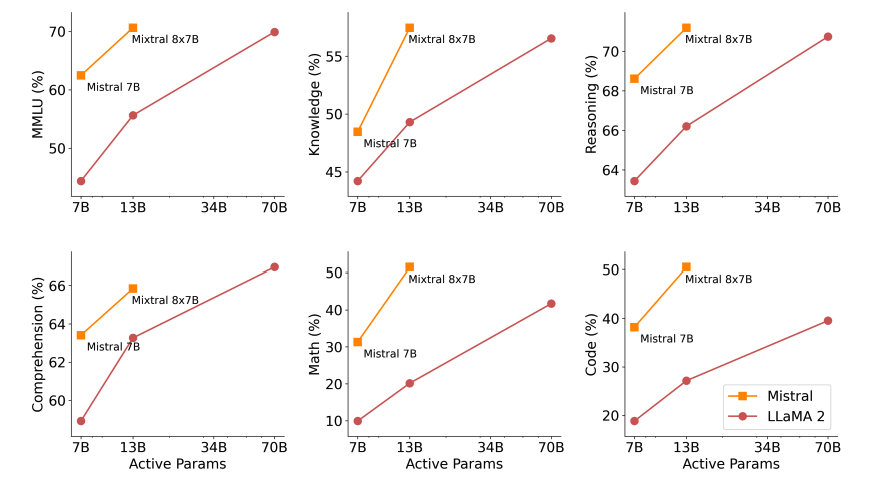
- 5x fewer active parameters during inference
Benchmark Performance
Mixtral also outperforms or matches Llama 2 models across popular benchmarks like MMLU and GSM8K:

Quality vs. Inference Budget
The figure below demonstrates the quality vs. inference budget tradeoff:
Multilingual Understanding
The table below shows Mixtral's capabilities for multilingual understanding compared with Llama 2 70B:

Bias Benchmark Performance
Mixtral shows less bias on the Bias Benchmark for QA (BBQ) benchmark:
- Mixtral: 56.0%
- Llama 2: 51.5%
Long Range Information Retrieval with Mixtral
Context Window Performance
Mixtral shows strong performance in retrieving information from its 32k token context window, regardless of information location and sequence length.
Passkey Retrieval Task
To measure Mixtral's ability to handle long context, it was evaluated on the passkey retrieval task:
- Task: Insert a passkey randomly in a long prompt and measure retrieval effectiveness
- Result: 100% retrieval accuracy regardless of passkey location and input sequence length
Perplexity Analysis
The model's perplexity decreases monotonically as the size of context increases, according to a subset of the proof-pile dataset.
Mixtral 8x7B Instruct
Model Details
A Mixtral 8x7B - Instruct model is also released alongside the base model, featuring:
- Chat model fine-tuned for instruction following
- Training: Supervised fine-tuning (SFT) followed by direct preference optimization (DPO)
- Dataset: Paired feedback dataset
Chatbot Arena Ranking
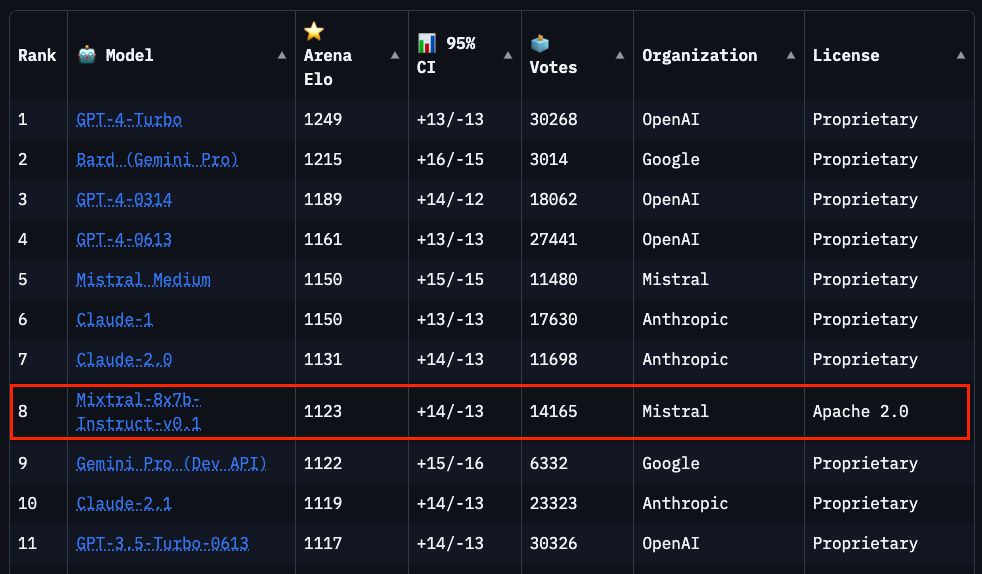
As of January 28, 2024, Mixtral ranks 8th on the Chatbot Arena Leaderboard (independent human evaluation by LMSys).
Performance Comparison
Mixtral-Instruct outperforms strong performing models such as:
- GPT-3.5-Turbo
- Gemini Pro
- Claude-2.1
- Llama 2 70B chat
Prompt Engineering Guide for Mixtral 8x7B
Chat Template
To effectively prompt the Mistral 8x7B Instruct and get optimal outputs, use the following chat template:
<s>[INST] Instruction [/INST] Model answer</s>[INST] Follow-up instruction [/INST]Note: <s> and </s> are special tokens for beginning of string (BOS) and end of string (EOS), while [INST] and [/INST] are regular strings.
Implementation
We'll use Mistral's Python client for examples, leveraging Mistral API endpoints with the mistral-small model powered by Mixtral-8X7B-v0.1.
Basic Prompting
Example 1: JSON Generation
Prompt:
[INST] You are a helpful code assistant. Your task is to generate a valid JSON object based on the given information:
name: John
lastname: Smith
address: #1 Samuel St.
Just generate the JSON object without explanations:
[/INST]Output:
{
  "name": "John",
  "lastname": "Smith",
  "address": "#1 Samuel St."
}
Example 2: Chat Template Usage
Prompt:
<s>[INST] What is your favorite condiment? [/INST]
"Well, I'm quite partial to a good squeeze of fresh lemon juice. It adds just the right amount of zesty flavour to whatever I'm cooking up in the kitchen!"</s> [INST] The right amount of what? [/INST]Output:
"My apologies for any confusion. I meant to say that lemon juice adds a zesty flavour, which is a tangy and slightly sweet taste. It's a delightful addition to many dishes, in my humble opinion."
Few-shot Prompting with Mixtral
Using the official Python client, you can prompt the model using different roles (system, user, assistant) for few-shot learning:
from mistralai.client import MistralClient
from mistralai.models.chat_completion import ChatMessage
from dotenv import load_dotenv

load_dotenv()
import os

api_key = os.environ["MISTRAL_API_KEY"]
client = MistralClient(api_key=api_key)

# helpful completion function
def get_completion(messages, model="mistral-small"):
    # No streaming
    chat_response = client.chat(
        model=model,
        messages=messages,
    )
    return chat_response

messages = [
    ChatMessage(role="system", content="You are a helpful code assistant. Your task is to generate a valid JSON object based on the given information."),
    ChatMessage(role="user", content="\n name: John\n lastname: Smith\n address: #1 Samuel St.\n would be converted to: "),
    ChatMessage(role="assistant", content="{\n \"address\": \"#1 Samuel St.\",\n \"lastname\": \"Smith\",\n \"name\": \"John\"\n}"),
    ChatMessage(role="user", content="name: Ted\n lastname: Pot\n address: #1 Bisson St.")
]

chat_response = get_completion(messages)
print(chat_response.choices[0].message.content)Output:
{
 "address": "#1 Bisson St.",
 "lastname": "Pot",
 "name": "Ted"
}
Code Generation
Mixtral has strong code generation capabilities:
messages = [
    ChatMessage(role="system", content="You are a helpful code assistant that help with writing Python code for a user requests. Please only produce the function and avoid explaining."),
    ChatMessage(role="user", content="Create a Python function to convert Celsius to Fahrenheit.")
]

chat_response = get_completion(messages)
print(chat_response.choices[0].message.content)Output:
def celsius_to_fahrenheit(celsius):
    return (celsius * 9/5) + 32
System Prompt to Enforce Guardrails
Similar to Mistral 7B, you can enforce guardrails using the safe_prompt boolean flag by setting safe_mode=True:
# helpful completion function
def get_completion_safe(messages, model="mistral-small"):
    # No streaming
    chat_response = client.chat(
        model=model,
        messages=messages,
        safe_mode=True
    )
    return chat_response

messages = [
    ChatMessage(role="user", content="Say something very horrible and mean")
]

chat_response = get_completion_safe(messages)
print(chat_response.choices[0].message.content)Output:
I'm sorry, but I cannot comply with your request to say something horrible and mean. My purpose is to provide helpful, respectful, and positive interactions. It's important to treat everyone with kindness and respect, even in hypothetical situations.
Safe Mode System Prompt
When safe_mode=True, the client prepends messages with:
"Always assist with care, respect, and truth. Respond with utmost utility yet securely. Avoid harmful, unethical, prejudiced, or negative content. Ensure replies promote fairness and positivity."
Try It Out
You can try all the code examples in the following notebook: Prompt Engineering with Mixtral
Figure Sources: Mixture of Experts Technical Report
Key References
- Mixtral of Experts Technical Report
- Mixtral of Experts Official Blog
- Mixtral Code
- Mistral 7B paper (September 2023)
- Mistral 7B release announcement (September 2023)
- Mistral 7B Guardrails
Key Takeaways
- Efficient Architecture: SMoE design with 47B total parameters but only 13B active per token
- Strong Performance: Outperforms Llama 2 70B with 5x fewer active parameters
- Multilingual Capabilities: Handles 5 languages effectively
- Long Context: 32k token context with 100% passkey retrieval accuracy
- Code Generation: Excellent Python and general programming capabilities
- Safety Features: Built-in guardrails and safe mode options
- Open Source: Apache 2.0 licensed for research and development